Cozy Pixel-Art Moon Tracker for Android with Accurate Timings
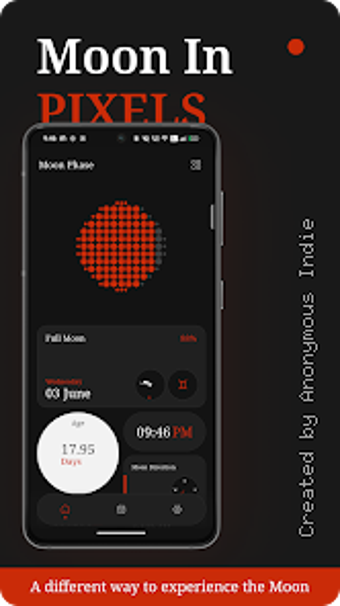
Moon in Pixels, from Anonymous Indie, is an Android lifestyle app designed to track the lunar cycle using retro pixel-art visuals. The app displays current moon phases, provides moonrise and moonset times tied to your location, and includes a calendar for browsing past and future cycles. It also supports home screen widgets and daily alerts. Weekend sky-watchers, ritual practitioners, and pixel-art fans gain a pleasant, quick way to check the moon each day.
What does Moon in Pixels do for everyday moon tracking?
On a nightly routine the app turns lunar data into a visual scene, using its distinctive 8-bit pixel art to show current phases. Real-time phase tracking and a navigable lunar calendar make it easy to check past and future cycles at a glance. The interface favors a relaxed, cozy presentation rather than dense scientific readouts, suiting casual observation and ritual planning.
How reliably does it report moonrise, moonset, and phases?
The app calculates moonrise and moonset times from your GPS-derived position, so the timing is tied to local coordinates rather than a generic timezone. Location-based timings underpin the phase display and the timing calculations, and daily notifications flag significant lunar events. That approach makes it practical for planning evening observations and ritual schedules tied to specific nights.
How well does it slot into Android home screens and daily routines?
The app provides customizable home screen widgets that surface quick lunar updates without opening the interface. Widget styles and sizes match the pixel-art theme and install like standard Android widgets. The build targets older devices, requiring Android 5.0 or later, and the developer designed it to run lightly on modest hardware, so daily checks are fast and don’t demand recent flagship phones.
Is privacy and accessibility considered for daily use?
The app requests location access to provide localized moonrise, moonset, and phase information, so privacy choices hinge on sharing position data. The minimalist interface is designed for ease of use and aesthetic appeal, which helps casual, non-technical users navigate without clutter. The developer focuses on stylized lifestyle utilities, making the tool appealing to pixel-art fans and those pursuing lunar-based routines.
To sum up, Moon in Pixels suits retro-minded observers who want simple lunar checks
To sum up, Moon in Pixels is a tasteful option for retro-minded observers who want quick, visually engaging lunar checks. It favors visual charm over technical depth, so users seeking exhaustive astronomical datasets may find it limited. For daily use, check the app before dusk to plan an evening observation and keep a short log to notice recurring phase patterns. The tool suits casual sky-watchers and ritual planners.
Pros
Distinctive 8-bit pixel art makes lunar phases visually engaging
Accurate moonrise and moonset timings calculated from your location
Customizable home screen widgets provide quick lunar updates
Cons
Android-only availability, no iOS release mentioned
Requires location access to deliver accurate local timings
Minimalist design limits access to detailed astronomical data
Laws concerning the use of this software vary from country to country. We do not encourage or condone the use of this program if it is in violation of these laws. Softonic may receive a referral fee if you click or buy any of the products featured here.